


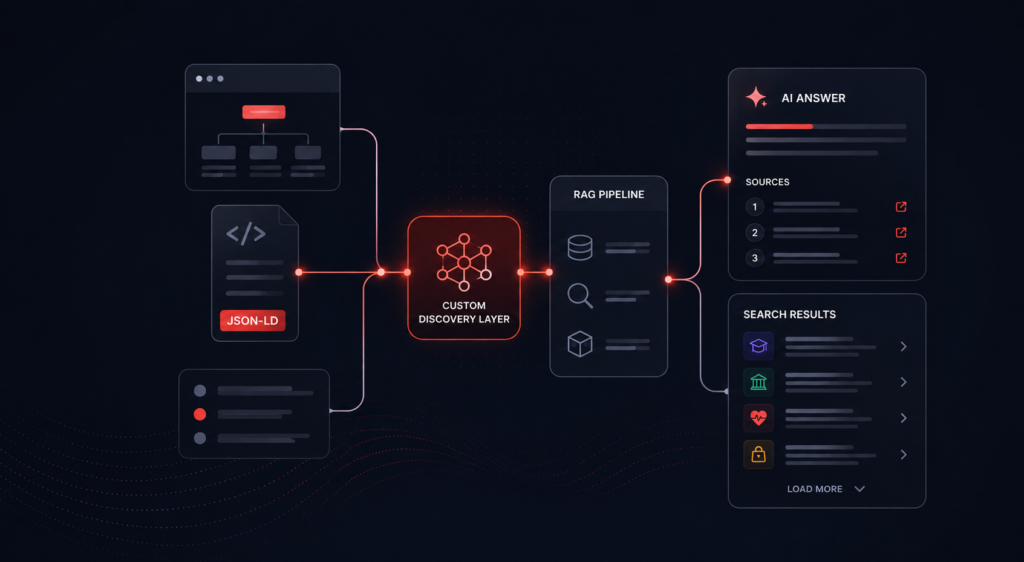
When a retrieval-augmented system gives a weak answer, there is a familiar reflex. We reach for the retrieval knobs. On a recent project, the more durable lever turned out to be in how the client had already organized their own website, in the discovery logic that most RAG pipelines flatten and throw away. This is a walk through what we found, and what it changed about how we design retrieval.
The reflex, and where it runs out
When answers come back thin, the instinct is to tune retrieval. Chunk sizes, embedding models, similarity thresholds, rerankers. These matter, and they are worth getting right. But they are also brittle. The best settings are highly corpus dependent, so the moment a client changes their content, the numbers you carefully found no longer hold. You re-tune, and the effort rarely tracks the payoff.
It helps to be precise about what we are tuning. This is naive RAG: flat embeddings over crawled text, the vanilla setup that most systems start from. It is not the only option. GraphRAG and other hierarchical representations try to preserve the relationships between pieces of content rather than flatten them, and they can genuinely help. But whether the representation is flat or hierarchical, there is a question that sits upstream of all of it, and no amount of tuning answers it. How has the site owner already organized discovery on their site, and are we capturing that at all?
The naive setup ignores that question entirely. You crawl the pages, dump the words into an index, and hope the right chunk floats to the top. If retrieval starts from a flattened pile with no sense of how the site actually guides a visitor, technical tuning on its own tends to leave you below what the site itself could have told you. Something is missing before the query ever arrives, in how the content and its discovery logic are captured in the first place.
The reframe: the site has already solved discovery, in its own way
A content-heavy website is not a random collection of pages. The owner has organized it around how their audience looks for things and how the business wants to be found. In other words, they have solved discovery in certain ways, through the navigation flows and custom patterns they built into the site. Those flows encode two kinds of intent at the same time. There is user intent, what a visitor is trying to find. And there is business intent, what the organization wants to surface for a given topic.
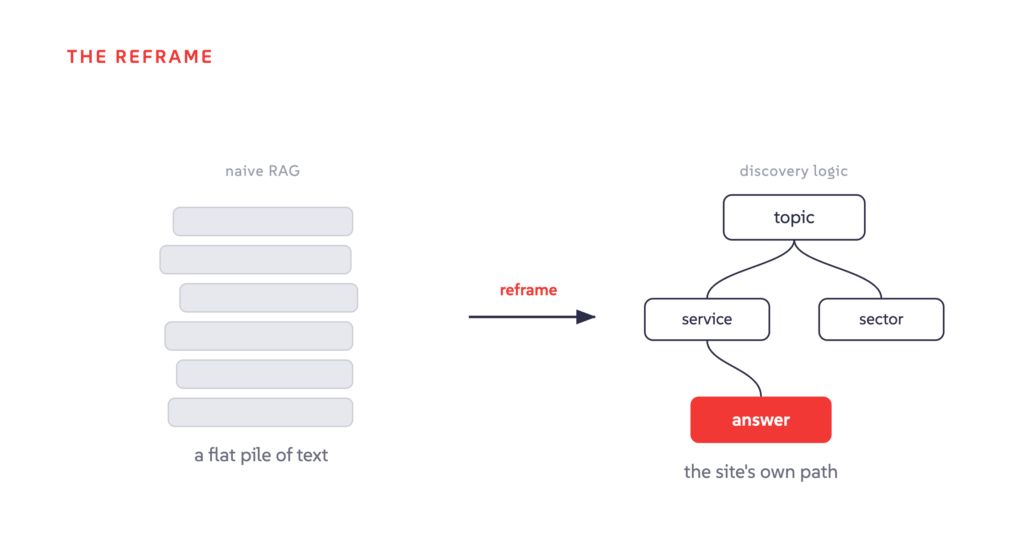
That discovery logic is worth treating as a benchmark. If a motivated visitor can reach the right answer by spending a few minutes navigating the site, that path is a baseline our retrieval should at least match. Generative search and keyword search both exist to save the visitor that exploration time, bringing the URL, or the answer itself, to them. So the first question in RAG solution design is not “what chunk size should we use.” It is “how has this client already solved discovery, and what do their navigation flows tell me about user and business intent?”
Two things follow from treating the site as a baseline. First, we should not fall below it by only tuning RAG-specific technical parameters, which is exactly the trap in the section above. Second, once we match it, the interesting work begins. A model can do things a human clicking through pages one at a time cannot, and that is where retrieval design should aim next. More on that at the end.
The case: a site organized around how people actually look for help
The specific client is anonymized here, but the shape is common. It was a professional services firm with a large team of specialists, and its content was organized by sectors and services. The discovery pattern that mattered was simple to describe and easy to miss: under each topic page, the firm listed the key contacts who handle that topic. The order of that list mattered too. The first contact was the person the firm most wanted associated with the topic, the one they would want to see named in an answer. So the route from a question to the right person, and to the right person first, was already drawn on the site. A visitor with a topic in mind would land on the relevant sector or service, then find the specialist. The firm had made a deliberate editorial choice about who appears, and in what order. That is business intent, expressed directly through how the site is organized and navigated.
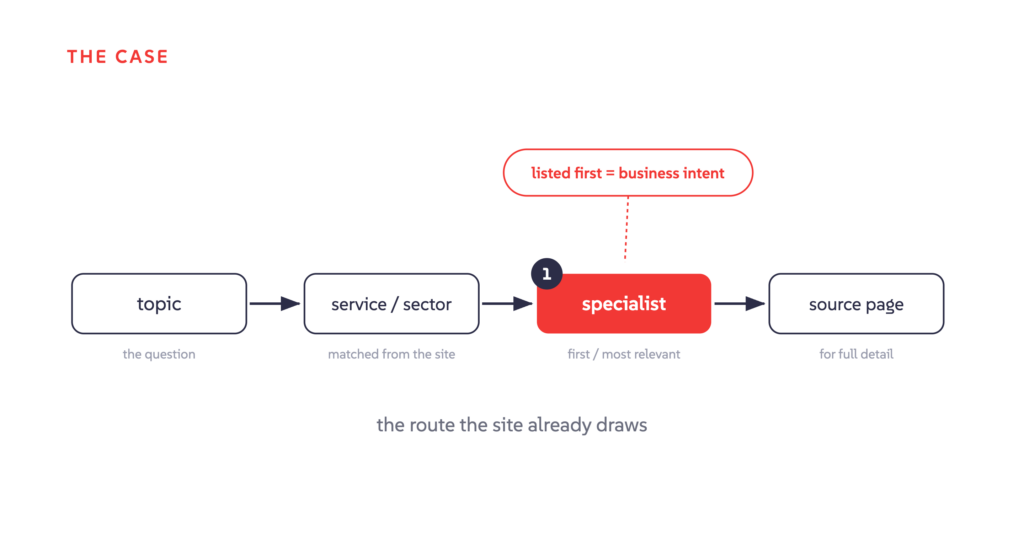
At first we approached the problem from the outside. We knew there were people pages and topic pages, but we had not studied how the site itself connected them. The turning point was realizing the firm had already solved the matching problem through their own navigation. Inventing our own mapping between topics and specialists would have been the wrong move, and to be honest it is not something we or any RAG provider could pin down reliably on our own. That knowledge belongs to the business. Our job was to take as much as possible from what the business already knows and has published, without layering assumptions of our own on top, and then make that usable and maintainable.
Reading the discovery logic, not just the markup
It would be easy to say the answer was in the structured data. That is not quite right, and the distinction is the whole point of this article. The site did carry schema.org markup in an application/ld+json block, and that markup is genuinely useful. JSON-LD, which stands for JSON for Linking Data, gives you a clean, machine-readable account of the entities on a page and, in richer cases, the relationships between them. It is one of the better ways to understand a site quickly.
But structured data helps you understand the site. It is not the thing that solves discovery. The thing that solves discovery is the navigation flow the owner built, the custom pattern by which a visitor gets from a question to an answer. Those patterns look different on every site:
- On the firm in this case, it was key contacts listed, in a deliberate order, under topic pages, so the route from a topic to the right specialist was already drawn.
- On another site it might be the menu and submenu hierarchy, which quietly encodes how the owner thinks their content relates.
- On another it might be a naming convention, where a code or reference prefix signals a category or a level. A course-code prefix in higher education, or a part-number scheme in manufacturing, carries meaning that a visitor learns to read.
None of these live in a standard schema. They are the owner’s own discovery logic, and they are exactly what a flat index throws away. It helps to see this logic for what it is. It is not the usual page content. It is metadata, a form of structured data in its own right, and often the most useful kind. Schema.org markup, where it exists, is one of the better inputs for reading it, because it names the entities for you. But the markup is only an input. The discovery logic is the thing you are actually after.
Two problems: encoding the logic, and maintaining it
Designing retrieval around a site’s discovery logic breaks into two problems, and the second is harder than the first.
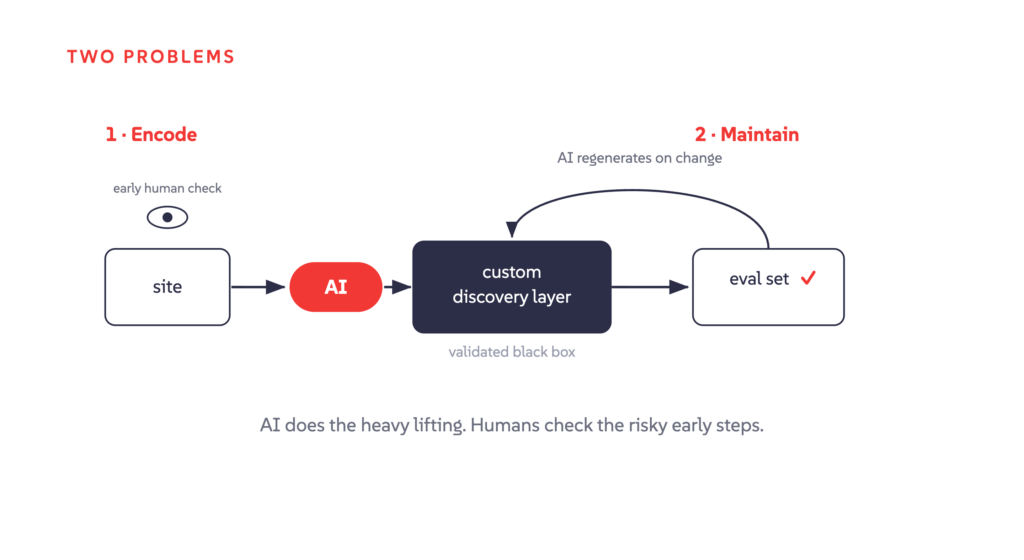
The first is identifying and encoding the custom solution. You analyze the site, work out how discovery actually happens on it, and encode that as logic the pipeline can follow. For the firm in this case, that meant reproducing the topic-to-contact route, in the order the firm intended. When a query arrives, detect the topic dynamically, match it against the enumerated list of services and sectors the model has been given from the site, narrow to one service or sector, retrieve the associated specialists, and then, because a topic page often holds only part of what a visitor needs, navigate to the specialist’s own page for the fullest detail.
The path we encoded looked like this:
topic → matched service or sector → relevant specialist → source page for full detail
The second problem is maintaining that custom solution inside a general product, and this is where most of the difficulty lives. Custom logic per client is powerful, and done the usual way it is a maintenance burden. Hand-written custom code for every client is the kind of thing that quietly becomes unmaintainable, and it is the reason teams avoid customization even when it would clearly help the customer.
This is where we lean on AI models to do the heavy lifting. The site analysis, the encoding of the discovery logic into custom code, and the ongoing maintenance of that custom layer are handed to AI models rather than owned line by line by an engineer. We treat the custom layer more like a validated black box than like code we hand-maintain. We check that it produces the right behavior against an eval set, and when the site changes or the behavior drifts, we regenerate and re-validate rather than patch by hand.
Handing work to AI does not mean taking people out of it. The early steps carry the most risk, so they get light but deliberate manual review. Website discovery analysis, user intent categorization, business intent, and llms.txt preparation are the points where a quick human pass matters most, because a gap or a hallucination caught there does not snowball into everything downstream. Past those early steps, eval runs carry more of the load. Custom code stops being a liability when a human is not hand-maintaining every line of it, and when the risky early judgments still get a set of human eyes. That combination is what makes site-specific discovery logic viable in a product rather than only in a one-off engagement.
The honest limits
This is not an argument for copying a site’s structure into the pipeline. Hardcoding a client’s current layout is fragile. It breaks the day they redesign, and it puts them in the awkward position of needing to check with their search vendor before changing their own website. That is the wrong dependency to create. What we want to capture is the intent behind the navigation, how the owner thinks about their content and their audience, not the literal shape of today’s menus.
It is also worth being clear that not every site needs this. A custom discovery layer is warranted only when the site’s own logic is doing real work. In our firsthand experience, plenty of sites get excellent answer quality from the vanilla RAG pipeline alone, and adding a custom layer there would be complexity for its own sake.
When a custom layer does make sense, the logic still has to come from somewhere, and the best results come from a shared middle ground rather than either side working alone. Sometimes the client can hand over their discovery logic directly. Sometimes it starts from a common standard. Generating an llms.txt for the site early, for instance, gives both sides a concrete artifact to align on, and the mapping it produces can feed the downstream steps. It cuts the other way too. That same analysis can hand the site owner proactive feedback on where their own structure is unclear, so they can improve the site itself. The method does not depend on JSON-LD, or on any one signal. It depends on there being some faithful representation of how the content is organized and why.
Why this generalizes
A website is one way a client presents their knowledge. Tomorrow it might be a structured feed, or an MCP server that an agent reads directly. The surface will change. The underlying task will not. Understand the client’s data structure and navigation, read the user and business intents encoded in them, and design retrieval around that understanding. The specific discovery logic from this project will not carry over to the next client. The approach will.
Match the human navigator, then go past it
Treat the human navigation path as the baseline, not the ceiling. Matching it means something specific. The core questions a visitor could answer for themselves with a bit of manual searching must be answered by the system too. That is the floor, and it is non-negotiable.
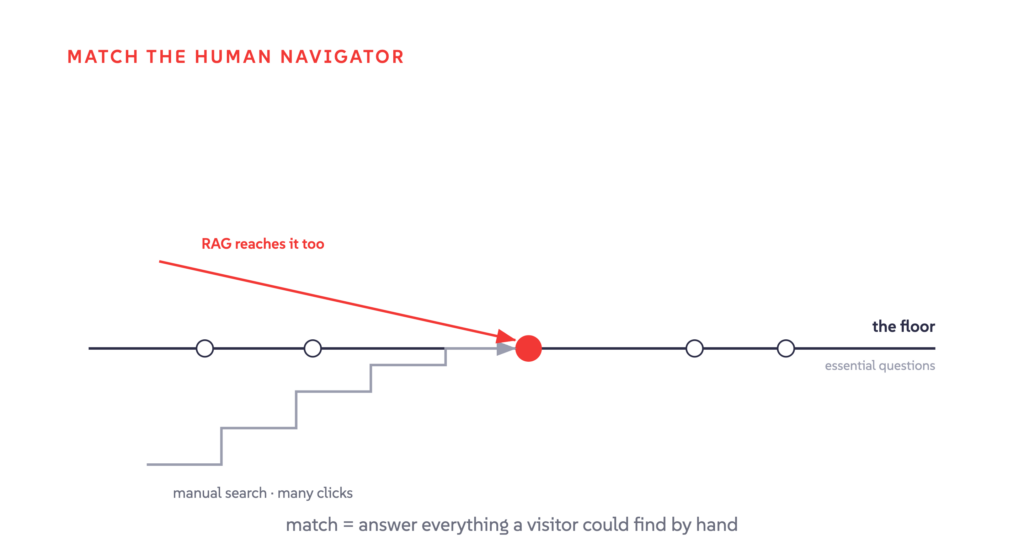
Above that floor is the work a human discoverer finds genuinely hard. Comparison queries that weigh two options against each other. Questions that synthesize an answer from several documents at once. Summaries that pull a topic together from across the site. A model can hold the full list of services and sectors in view at once, follow relationships the site implies but never states on any single page, and resolve a query that spans two topics rather than one. Those are the things a visitor clicking through pages one at a time cannot easily do.
There is also a quieter payoff, and it is worth naming: routing. Once you understand the site map and the discovery flow, you can route a query to the right subsection before retrieval runs, which is exactly where the tuned retrieval knobs start to earn their value. So the discovery layer and the retrieval tuning are not rivals. Structure routes the query to the right place, and tuning does better work once it is there. One complements the other. Neither replaces it.
Where this leaves us
The lesson from this project was not about one markup format. It was a change in where we start, and it reinforces some good old engineering discipline. Understand the requirement before building. Do not reinvent the wheel, and capture the authentic knowledge the business already has instead. Avoid introducing new mappings and complexity you do not need. And be deliberate about maintainability from the start. Before reaching for the retrieval knobs, read how the client has already solved discovery, encode that logic, and lean on AI models to keep the custom layer maintainable.
That thinking sits behind how we build search and discovery at AddSearch. One platform, one index, and answers grounded in your own content with source citations, so visitors get direct answers and a clear path to the source, drawn from what you have actually published.
If you want to see how that works on your content, book a demo.
